How to Copy Trade FOMO Wallets
What FOMO wallets are, how to spot them, and how to set up automated copy trading.
On this page
Finding early entries on fast-moving memecoins manually can be difficult. By the time you notice a profitable wallet or token manually, faster traders and automated tools may already be in.
That’s why copy trading is popular among traders. Instead of trying to guess which token is going to run, you set up an automated tool to mirror traders who have a record of catching early entries.
If you want to follow these traders without getting caught by latency or bad entries, an automated setup helps. This guide covers what people mean by a FOMO wallet, how to spot one, how to choose one worth copying, and how to set up automated copy trading.
 Step 1Find a wallet on FOMO
- Step 2Review its history
- Step 3Add it to a bot
- Step 4Set your copy rules
- Step 5Copy trade automatically
What Do People Mean by a ‘FOMO Wallet’?
“FOMO wallet” isn’t a formal wallet category. In this guide, it means a wallet you’ve found through FOMO, or any wallet you might want to monitor and copy. It’s usually one of these:
- Insider or Deployer Wallets: Accounts buying tokens in block 0 or block 1, often before most people have seen the contract.
- KOLs / Callers: Big accounts whose buys can trigger buying volume across alpha channels.
- Smart Money Traders: Traders that repeatedly enter tokens early and show a profitable trading history.
You can spot these wallets on tools like FOMO or GMGN. Look for the same wallet showing up in early buyer lists on tokens that went on to do well.
Tracking them on an app is useful, but copying their trades by hand is slow. By the time you open Phantom, paste the CA, and hit swap, the price may already have moved significantly. A bot can place the trade for you automatically when the wallet moves.

Our pick
Use Dawn to copy these wallets automatically, straight from Telegram.
CrossMeme may earn a commission if you sign up through this link, at no extra cost to you.
Why Use Dawn for Copy Trading?
FOMO doesn’t have copy trading built in, so you can’t copy a wallet inside the FOMO app. You find the wallets there, and copy them with a separate tool. Dawn is the tool this guide uses for the copying. When a wallet you’re following makes a move, Dawn detects the transaction and places a matching trade from your own balance.
- Fast Execution: Copies are placed automatically, with priority fees priced from live network conditions so they land quickly.
- Buy Filters / Max Buy Protection: Skip tokens above or below a market cap, with too little liquidity, or too new, so you don’t buy after a token has already pumped.
- Automatic Stop Loss & Take Profit: Set your exit levels once and every copied buy sells automatically when it hits them.
How to Copy Trade a FOMO Wallet with Dawn
You’ll need the wallet address or FOMO profile you want to copy before starting the setup below.
Phase 1 of 3: Accessing Copytrade
Open the Dawn Telegram Bot and send
/start.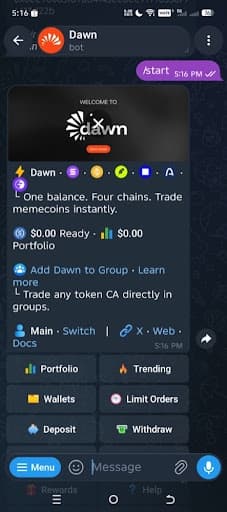
From the main action keyboard, select Copytrade.
Tap “+ Follow a Trader” to initiate the wizard setup.
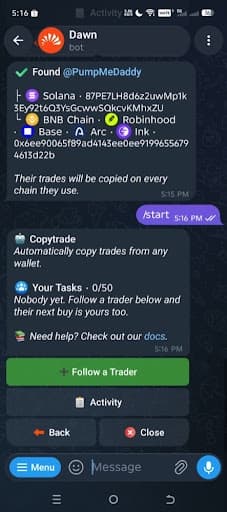
Phase 2 of 3: Bot Setup Wizard (Steps 4–11)
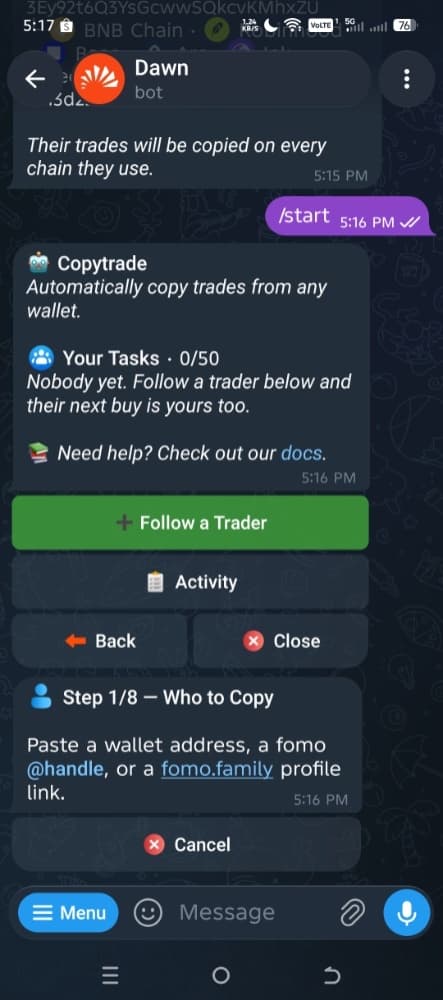
Who to Copy
Paste your target wallet address or FOMO handle into the chat.
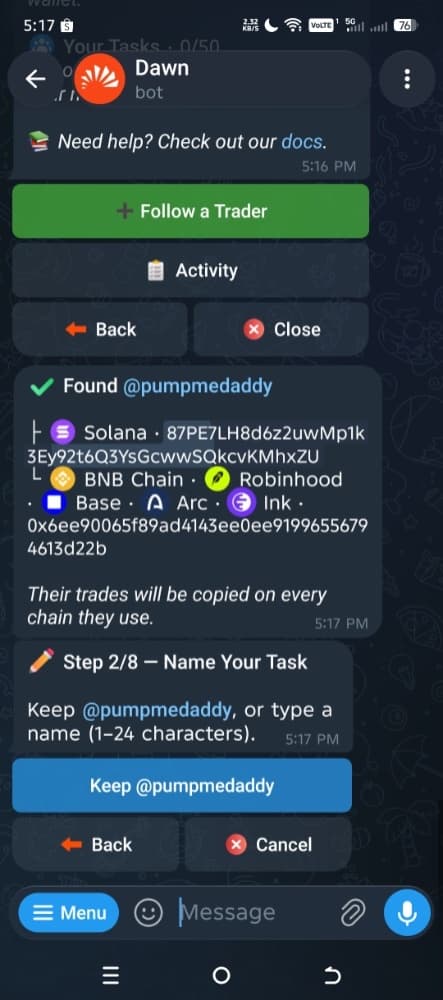
Name Your Task
Keep the trader handle default name or type a custom task label.
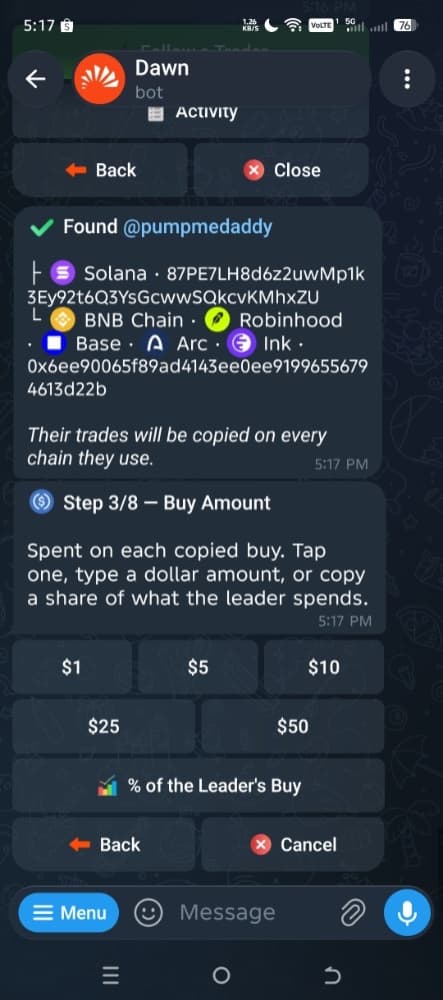
Buy Amount
Choose a fixed dollar allocation per trade (e.g., $1, $5, $10, $25, $50) or select % of the Leader’s Buy.
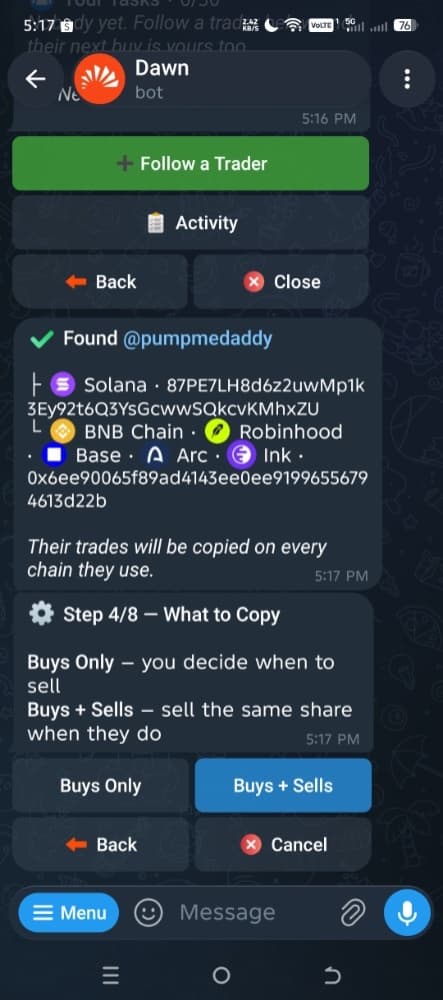
What to Copy
Select Buys + Sells if you want Dawn to mirror both entries and exits. Choose Buys Only if you prefer to manage your own sells.
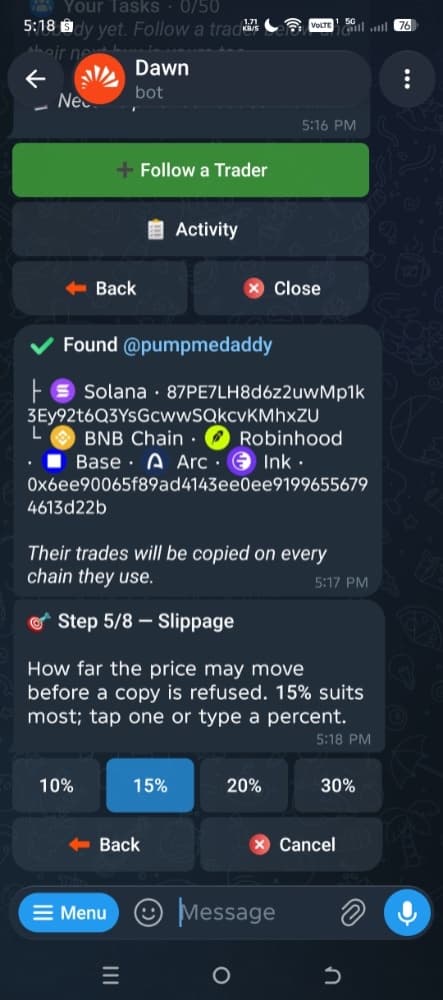
Slippage
Tap your preferred maximum price slippage threshold (e.g., 10%, 15%, 20%, 30%).
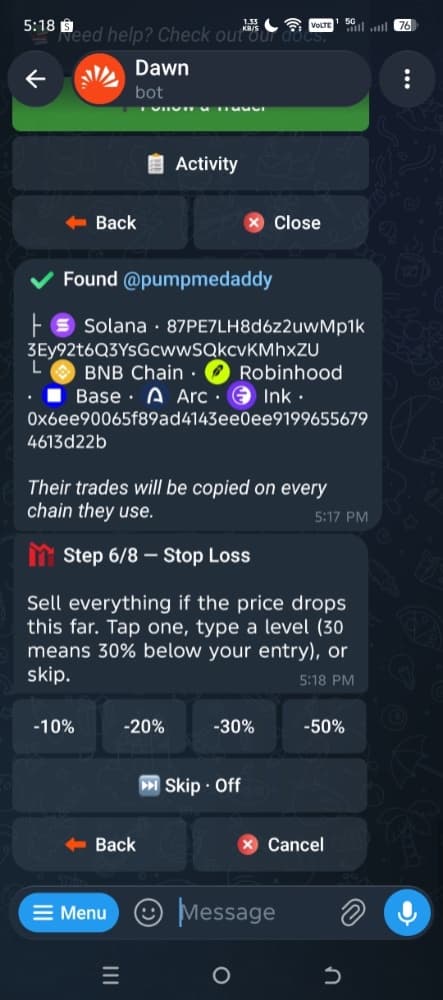
Stop Loss
Set a strict automated downside exit point (e.g., -10%, -20%, -30%, -50%) or tap “Skip · Off”.
Take Profit
Set an automated upside exit target (e.g., +50%, +100%, +200%, +500%) or tap “Skip · Off”.
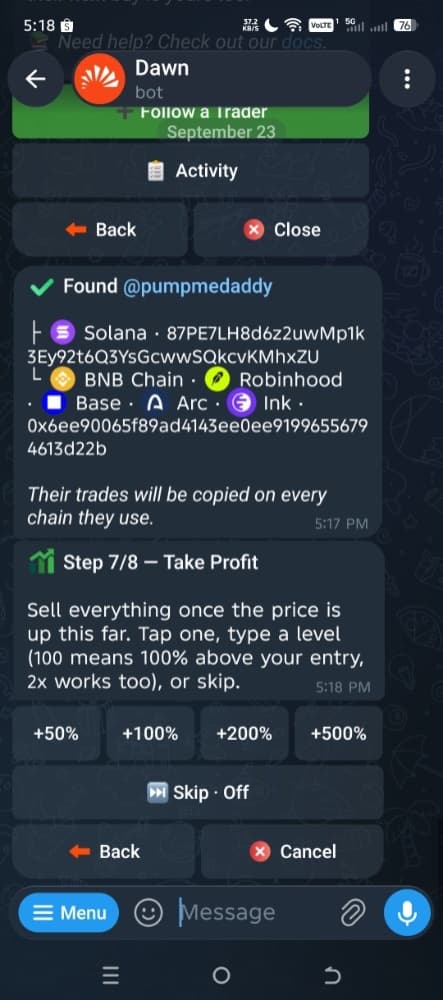
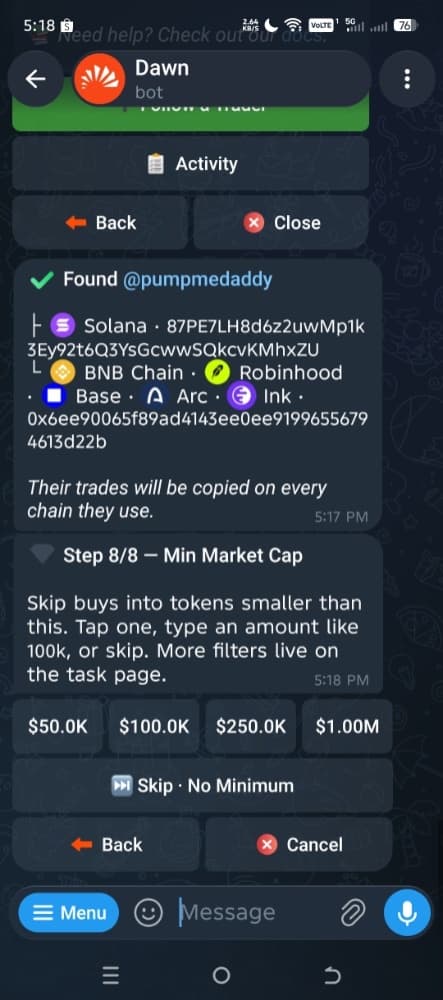
Min Market Cap
Select a minimum market cap threshold to filter out tiny market cap tokens (e.g., $50.0K, $100.0K, $250.0K, $1.00M) or tap “Skip · No Minimum”.
Phase 3 of 3: Review & Activation
Review Parameters
Double-check your final parameters summary (Name, Buy Amount, Mirror Sells, Slippage, Stop Loss, Take Profit, Min Market Cap).
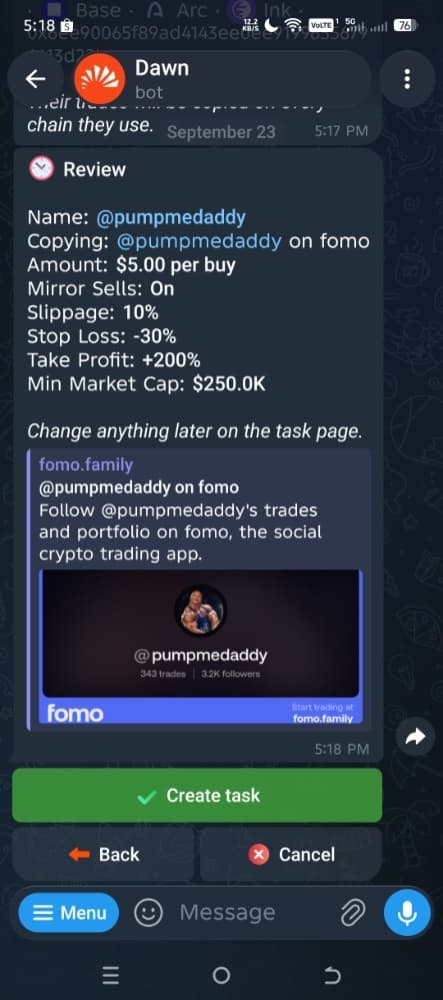
Create Task
Tap the green “Create task” button.
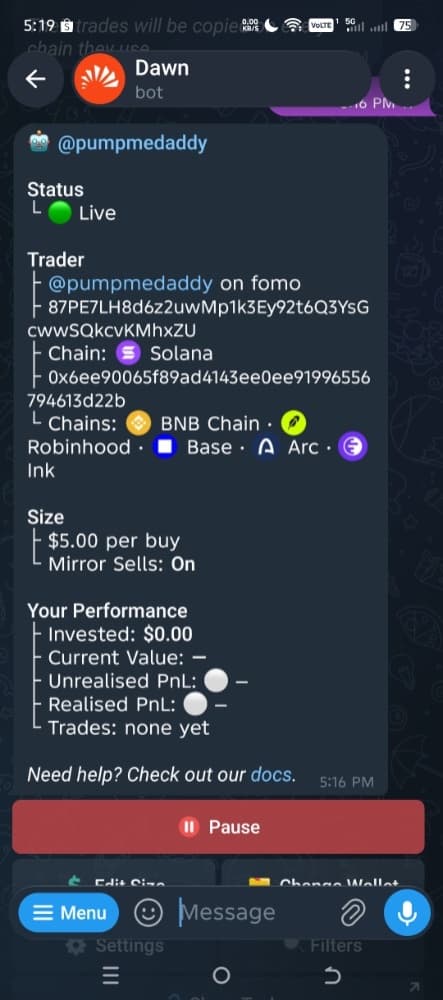
Status Check
Your Copytrade task will move to Status: Live, and you can pause, edit buy size, change wallet, or apply additional filters anytime from the task dashboard.
Optional: Add More Filters
Once the task is live, open it from your task list and tap Filters to add limits such as maximum market cap, liquidity, volume, holders, Top 10 concentration and token age. These are checked before copied buys and can help avoid trades that fall outside your rules.
How to Choose a Wallet to Copy
A wallet that looks good on a leaderboard isn’t automatically worth copying. Before you follow one, check:
- Profit history: Is it profitable overall, not just on its latest trade?
- Number of trades: A handful of trades tells you very little. A longer history gives you more to judge.
- Consistency over time: Steady results across weeks mean more than one great day.
- Win rate: How often it closes in profit, read alongside how big its wins and losses are.
- Average trade size: How much it usually puts in, and whether your copy size makes sense next to it.
- Liquidity of tokens traded: Thin pools mean more slippage on your copies and are easier to manipulate.
- One lucky trade: Check whether most of its profit came from a single trade.
- Recent vs older performance: A wallet that did well months ago may not be doing well now.
Past profitability doesn’t guarantee future results. Treat any wallet as something to test with small amounts, not something to trust.
- Profit historyProfitable overall, not on one trade
- Win rateRead alongside win and loss size
- Number of tradesEnough history to judge
- ConsistencySteady across weeks, not one day
- LiquidityTrades tokens with real depth
- Recent performanceStill doing well now
Walk away if you see
- One huge lucky trade
- Very low liquidity
- Sudden change in trading behaviour
A Quick Reality Check
Copy trading isn’t a free money button. A few rules of thumb to keep from getting wiped out:
Watch for Dev Baiting
Some token developers know people copy trade their wallets. They’ll buy their own token from a known “FOMO wallet” to bait bots into buying, then dump their hidden supply on you.
Start Small
Test every new target wallet with micro-positions ($1–$5 per copy) for 24–48 hours before raising your trade size.
Your results won’t exactly match the wallet
Copy trades can enter at a different price because of network latency, slippage and fast-moving prices.
Review performance regularly
Pause or remove a wallet if its recent performance or trading behaviour changes significantly.
The Bottom Line
Use FOMO to find wallets worth researching, then use Dawn if you want to automate copying their trades.
Step 1
FOMO
Find wallets worth copying
Step 2
Dawn
Copy their trades automatically
Then keep it safe
- Start smallSmall position sizes first
- Use filtersPlus risk controls on every task
- Review regularlyPast winners won’t always keep winning
FAQ
What does “FOMO wallet” mean?
It isn’t a formal wallet category. People usually mean a wallet found through FOMO, or one worth monitoring and copying: an insider or deployer wallet buying in the first blocks, a KOL or caller whose buys move volume, or a trader who repeatedly enters tokens early and shows a profitable history. Tools like FOMO and GMGN make them easier to spot.
How do I find a good FOMO wallet to copy?
Start by browsing FOMO or GMGN and noting wallets that appear in the early buyer lists of tokens that went on to do well. Shortlist the ones that do this repeatedly rather than once, are still trading actively now, and have enough trades behind them to judge properly.
What should I check before copying a wallet?
Go through its profit history and number of trades, how consistent its results are, its win rate, its average trade size, and the liquidity of the tokens it trades. Check whether its profit relies heavily on one lucky trade, how its recent performance compares with older results, and whether its trading style suits the level of risk you’re comfortable with. Past performance doesn’t guarantee future results, so it’s sensible to test with small amounts first.
Is copy trading FOMO wallets risky?
Yes. You might pick a wallet whose good run doesn’t last, copy into low-liquidity tokens where slippage eats into your entry, or get filled after the price has already moved. Some developers also bait copy traders by buying their own tokens from well-known wallets. Keep sizes small, use filters and a stop loss, and remember that past performance doesn’t guarantee future results.
Does FOMO itself support copy trading?
No. FOMO can be used to discover and research wallets, but the automated copying in this guide is handled through Dawn.
Can I copy trade a FOMO wallet automatically?
Yes, with a copy trading tool. You give it the wallet address or FOMO handle, choose how much to spend per trade and any limits, and it places matching trades from your own balance when the wallet trades. Dawn, the tool used in this guide, works this way, and you can pause or stop copying at any time.
Can I copy a FOMO wallet using its username instead of its address?
Yes. At Dawn’s Who to Copy step you can paste the trader’s FOMO @handle or fomo.family profile link instead of a wallet address.
Can Dawn copy a FOMO trader on more than one chain?
Yes. Paste a FOMO @handle or fomo.family profile link and Dawn follows that trader’s wallets on every chain they trade; you can untick chains later in the task’s settings. A Solana address is copied on Solana, and an EVM address on the chains you pick.
How much do I need to start copy trading on Dawn?
Each copy has to be at least $1. You can set a fixed dollar amount per buy, or a percentage of the leader’s buy with an optional cap. Starting small on any new wallet is the safer way to test it.
What fees does Dawn charge for copy trading?
Copied trades are charged like any other Dawn trade: a 1% fee on each buy and sell, with 25–55% of it paid back to you as cashback depending on your 30-day volume. Dawn also covers network gas up to $5 per trade, so you don’t need to hold SOL, ETH or BNB for gas.
Does Dawn copy sells as well as buys?
Only if you want it to. Buys Only leaves selling to you; Buys + Sells sells the same share of your position when the trader sells. You can switch this later with Mirror Sells on the task page.
Can I pause or change a Copytrade task after it’s live?
Yes. From the task page you can pause or resume it, edit the buy size, move it to another wallet, change settings like slippage and auto sell, add filters, or delete it. Anything it already bought stays in your wallet either way.
Related guides
- Guide5 stepsUpdated Sep 2026How to Trade Cross-Chain MemecoinsLearn how to trade cross-chain memecoins across Solana, Base, BNB Chain and Robinhood Chain, including bots, fees, wallets, risks and how cross-chain trading works.
- Guide4 bots testedUpdated Sep 2026Best Cross-Chain Memecoin Bots in 2026I tested Dawn, Cove, Fomo and Banana Gun to compare usability, wallet security and trading speed across the best cross chain memecoin trading tools.
Trading memecoins involves significant risk. Information on this site is for educational purposes only. Links to bots are referral links: we may earn a commission if you sign up, at no extra cost to you.